Project & Task Management

Every Plan, Every Task, Every Team. One Connected System.

PlanPro handles from complex multi-year projects to a single operational task due next Tuesday.  All activities live in one system, connected to the team responsible, the strategy it supports, the budget it draws from, and the risks it carries. Throughout the organisation. 

A task completed in isolation is just a checkbox. A task connected to a strategic  goal is evidence of progress. 

National Development Plan

Digital Services Adoption

KPI: Service Digitalization 84%
Ministry Objective

Infrastructure Modernization

KPI: Cloud Migration 62%
Department Task

Cloud Security Audit

Owner: M. Tamm In Progress

What You Can Do with Every Task and Project

Structure & Templates
Execution & Tracking
Context & Reporting
Use flexible task types

Projects, single tasks, procurements, incidents, legislative items, or any custom type that matches your operations. PlanPro adapts to your terminology, not the other way around.

Combine tasks into action plans

Group related activities into structured plans with shared timelines, owners, and reporting.

Start faster with templates

Build project templates for recurring processes. Deploy them in seconds instead of rebuilding from scratch.

Assign ownership and teams

Every task has a responsible person and optional team members. No confusion about who owns what.

Set timelines that reflect reality

Start dates, due dates, interim milestones. Build schedules that account for dependencies and buffer time, not just deadlines.

Track status and priority

See what's on track, what's at risk, and what's overdue — at a glance, across the entire organization.

Attach files and link resources

Documents, URLs, reference materials. Everything related to a task activity lives with the task, not in someone's email.

Track results, not just completion

Expected results, comments, descriptions, and reporting fields give you substance beyond a checkbox.

Report with confidence

Monthly and quarterly reports generated from real-time data. Revision history and activity logs provide a complete audit trail.

Gantt Chart
Kanban Board
Custom Forms

Project Management Tools Built for How Organizations Actually Work

Gantt Chart — Multilayered Visual Planning
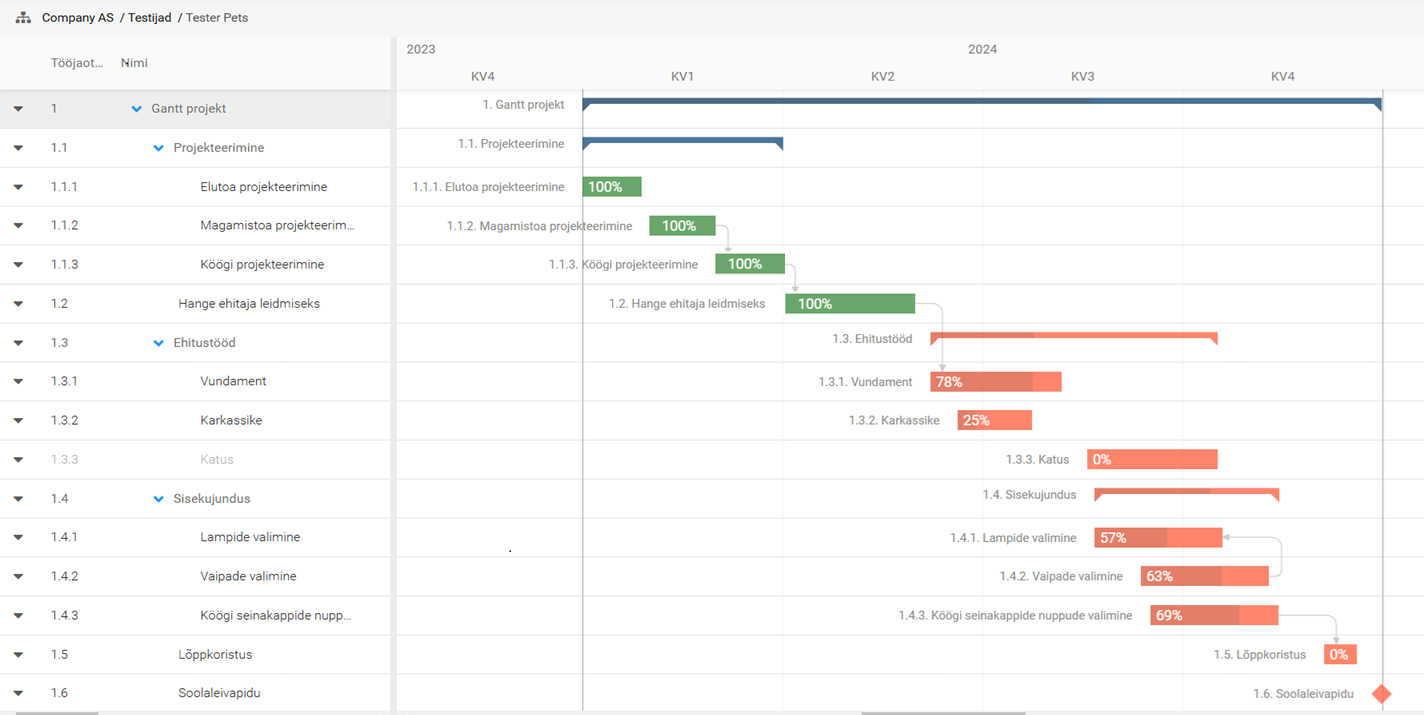
Gantt Chart

A timeline view is only useful if it reflects how work depends on other work.

PlanPro's Gantt chart lets you set predecessors, define constraints and buffers, and track task progress visually.

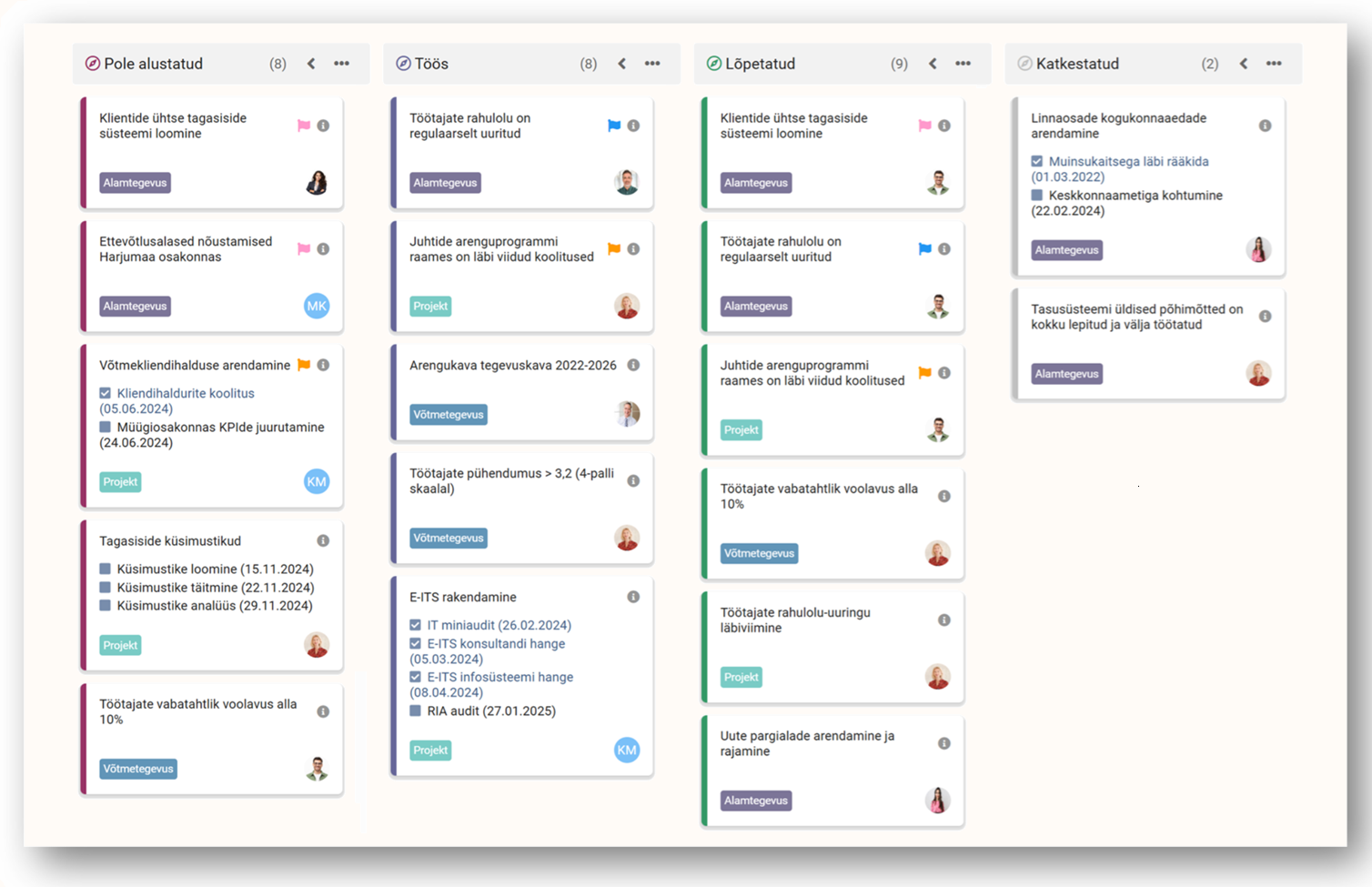
Kanban Board — Status-Based Oversight
Kanban Board

PlanPro's Kanban view gives you a status-based overview of all tasks. Drag tasks between stages and see bottlenecks forming.

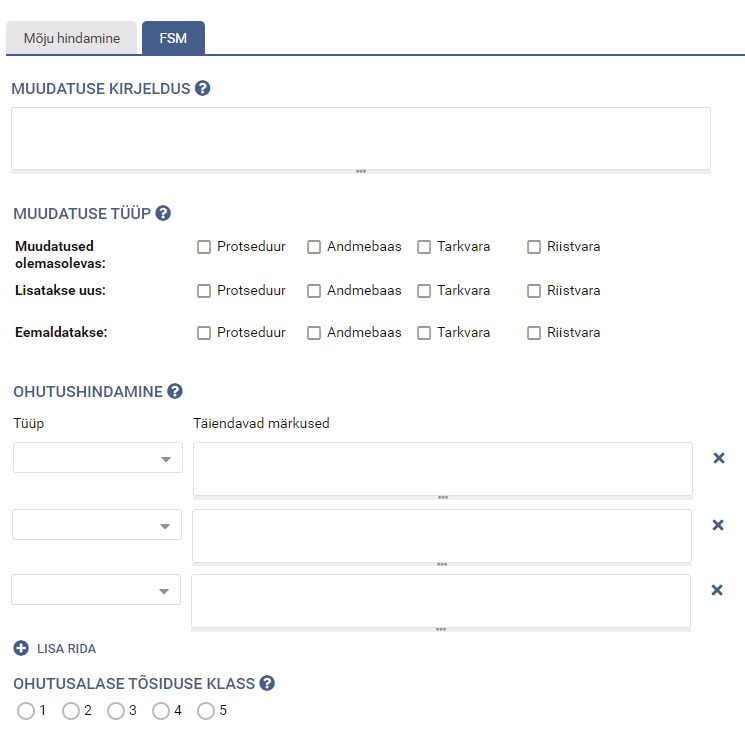
Customizable Forms — Process Management
Custom Forms

PlanPro lets you build custom data forms with the fields your processes require — text fields, dropdowns, and more.

See How PlanPro Can Help to Manage Your Projects and Tasks Throughout Your Organisation

Why This Isn't Just Another Project Management Tool

Project management tools help teams get tasks done. PlanPro helps organizations get the right tasks done. 

Every project and task in PlanPro can be connected upward to the strategic objective it supports. This means leadership doesn’t just see a list of active projects.  

They see which strategic goals are on track, and which are falling behind, based on the actual progress of the work underneath.

Strategic Objective Organizational Priority
Project & Timeline Daily Execution
Individual Tasks Performance

Your Projects Don't Exist in a Vacuum. Neither Should Your Software. ​

Every project links to the strategic goal it supports. When the board asks "what are we doing about priority #3?" the answer isn't a spreadsheet — it's a live dashboard showing every project, task, and KPI connected to that goal.
Explore strategy execution →
Attach budget lines directly to projects. See planned vs. actual cost as work progresses — not three months later when finance reconciles the spreadsheet.
Explore budgeting →
When a key project threatens a strategic objective, the risk register should reflect that connection. PlanPro links risks to specific projects and strategies, so leadership sees exposure in context.
Explore risk management →
How many hours did the procurement team spend on infrastructure project X vs. routine tasks? PlanPro tracks planned vs. actual hours by project and team — so resourcing decisions are based on evidence.
Explore time tracking →
Tasks completed in PlanPro flow directly into employee performance reviews. Managers evaluate what people actually delivered throughout the year, not what they remember from the last month.
Explore appraisals →

Project Management Built for Your Sector

Ready to See Project Management Connected to Strategy?

Book a personalized demo. We’ll show you how PlanPro handles your project types, your team structure, and your reporting needs — in 45 minutes or less. 

   See Plans & Pricing 

What Our Customers Say

Frequently asked questions

How is PlanPro different from tools like Monday.com, Asana, or MS Project?

Those tools are built for team-level task management. They are excellent at helping a project manager organize their tasks — but they cannot show a department head whether those tasks are advancing this year's strategic priorities, they cannot connect project costs to budget plans, and they cannot link project risks to the organizational risk register.

PlanPro is a management system, not just a project tool. The project management module is one of six connected modules that together give leadership oversight from strategy through execution.

Can PlanPro handle both complex multi-year projects and simple daily tasks?

Yes. PlanPro manages everything from multi-year infrastructure projects with Gantt dependencies to single recurring tasks. The system adapts to the complexity of each activity — you do not need separate tools for different scales of work.

Can we customize task types and forms for our processes?

Yes. Task types (project, procurement, incident, legislative items, etc.) and data forms are fully customizable. You define the fields, statuses, and terminology that match your operations. PlanPro adapts to your language, not the other way around.

How does PlanPro generate work plans?

Work plans are assembled automatically from all tasks assigned to each employee across all projects and action plans. Managers see their team's full workload in one view — no manual compilation required.

Can PlanPro replace Excel for project tracking and reporting?

Yes. Most project managers spend hours assembling weekly or monthly reports from task lists, shared spreadsheets, and email threads. In PlanPro, reports are generated automatically from live project data — progress, deadlines, statuses, and assigned resources. One click produces the report that used to take an afternoon.

Clients report eliminating the majority of spreadsheets they previously used for work plans, project tracking, and status reporting.

Is PlanPro suitable for public sector project management?

PlanPro manages national and international projects in over 100 public sector organizations including government ministries, municipal governments, hospitals, and universities. The platform handles public sector project types that generic tools do not support well — procurements with regulatory milestones, legislative drafting processes, EU-funded projects timelines, and cross-institutional projects where multiple agencies share responsibility for delivery.

Ask for a free demo!

Please fill in the contact form and we will contact you.

I am interested in:

Read more about the privacy policy – HERE

Ask for a free demo!

Please fill in the contact form and we will contact you.

I am interested in:

Read more about the privacy policy – HERE
Reelika Ristolainen, PlanPro kliendihaldur-konsultant

Tarkvara võimalusi tutvustab Sulle
Reelika Ristolainen, kliendihaldur-tootekonsultant